
Unleash the Power of Google Ads Automation: Recognize the Signs of Success and Spot Performance Pitfalls!
Smart Bidding, Performance Max, and responsive search ads (RSAs) can all deliver efficiency. However, their positive impact hinges on their ability to optimize for the right signals. The effectiveness of these automated solutions is not flawed by design. The concern is that missteps can accumulate and lead to significant issues over time.
The challenge is not rooted in automation itself. It is about understanding when these automated systems are functioning as intended. It also involves knowing when they are causing harm to your campaigns. For example, Smart Bidding algorithms might not receive accurate or relevant data signals. This could lead to optimization towards an undesirable outcome. This scenario is especially perilous. The subtle drift in performance metrics can gradually inflate your Cost Per Acquisition (CPA). This inflation leads to wasted budget and inefficient ad spending.
Moreover, unchecked automation can result in a pipeline filled with low-quality leads, diluting the overall effectiveness of your marketing efforts. This flood of subpar leads complicates the sales process. Team morale can suffer as they sift through unqualified prospects. Monitoring and refining these automated strategies is crucial. You must have a robust feedback loop in place. This ensures that your campaigns remain aligned with your business objectives.
To navigate the complexities of automation effectively, it’s crucial to develop a strategy. This strategy should involve regular analysis. You should also make adjustments based on performance data. Here’s how to discern whether automation is aiding your campaigns. Leverage comprehensive analytics to scrutinize key performance indicators. Stay vigilant about shifts in lead quality. Be proactive about making necessary changes in your bidding strategies or ad placements. Understanding these dynamics will empower you to harness the full potential of automation without falling prey to its pitfalls.
When Automation Crashes: A Wake-Up Call
Automation can sometimes hinder performance instead of helping it.
Unleashing the Power of Performance Max: Tackling Cannibalization!
The issue
PMax often prioritizes cheap, easy traffic especially branded queries or high-intent searches you intended to capture with Search campaigns.
Even with brand exclusions, Google still serves impressions against brand queries, inflating reported performance and giving the illusion of efficiency.
On top of that, when PMax and Search campaigns overlap, Google’s auction rules give PMax priority. This means carefully built Search campaigns can lose impressions they should own.
A clear sign this is happening: Search Lost IS (rank) in your Search campaigns rises. At the same time, PMax spend increases. If this occurs, PMax is likely siphoning traffic.
Recommendation
Use brand exclusions and negatives in PMax to block queries you want Search to own.
Segment brand and non-brand campaigns so you can track each cleanly. And to monitor branded traffic specifically, tools like the PMax Brand Traffic Analyzer (by Smarter Ecommerce) can help.
Dynamic Auto-Applied Recommendations (AAR) Structure
The issue
AARs can quietly restructure your campaigns without you even noticing. This includes:
- Adding broad match keywords.
- “Upgrading” existing keywords to broader match types.
- Adding new keywords that are sometimes irrelevant to your targeting.
Google has framed these “optimizations” as efficiency improvements, but the issue is that they can destabilize performance.
Broad keywords open the door to irrelevant queries, which then can spike CPA and waste budget.
Recommendation
First, opt out of AARs and manually review all recommendations moving forward.
Second, audit the changes that have already been made by going to Campaigns > Recommendations > Auto Apply > History.
From there, you can see what change happened on what date. This allows you to go back to your campaign data. You can check if there are any performance correlations.
Transformative Conversions Amplifying Results
The issue
Modeled conversions can climb while real sales or MQLs stay flat.
For example, you may see a surge in reported leads or purchases in your ads account. However, when you look at your CRM, the numbers don’t match up.
This happens because Google uses modeling to estimate conversions where direct measurement isn’t possible.
If Google doesn’t have full tracking, it fills gaps by estimating conversions it can’t directly track. This is done based on patterns in observable data.
When left unchecked, the automation will double down on these patterns. It assumes they’re correct. This wastes budget on traffic that looks good but won’t convert.
Recommendation
Tell the automation what matters most to your business.
Import offline or qualified conversions (via Enhanced Conversions, manual uploads, or CRM integration).
This will ensure that Google optimizes for real revenue and not modeled noise.
Unleashing Automation: Deciphering the Hidden Signals
Not every warning in Google means automation is failing.
Sometimes the system is limited by the goals, budget, or inputs you’ve set and it’s simply flagging that.
These diagnostic signals help you understand when to adjust your setup instead of blaming the algorithm.
The Fiery Debate: Red vs. Yellow Statuses!
The issue
A Limited status doesn’t always mean your campaign is broken.
- If you see a red Limited label, this means your settings are too strict. That could mean that your CPA or ROAS targets are unrealistic, your budget is too low, etc.
- Seeing a yellow Limited label is more of a caution sign. It’s usually tied to low volume, limited data, or the campaign is still learning.
Recommendation
If the status is red, loosen constraints gradually: raise your budget and ease up CPA/ROAS targets by 10–15%.
If the status is yellow, don’t panic. This is Google’s way of indicating that they could use more money if possible. It’s not vital to your campaign’s success.
Ignite Your Advertising Success with Responsive Search Ads (RSAs)!
The issue
RSAs are built in real-time from the headlines and descriptions you have already provided Google.
At a minimum, advertisers are required to write 3 headlines with a maximum of 15 (and up to 4 descriptions). The fewer the assets you give the system, the less flexibility it will have.
If you’re running a small budget, Google won’t collect enough data. This happens when you give the RSAs all 15 headlines and 4 descriptions. This makes it difficult to figure out which combinations actually work.
The automation isn’t failing with either. You’ve either given it too little information or too much with too little spending.
Recommendation
Match asset volume to the budget allocated to the campaign.
- If you’re unsure, aim to write between 8-10 headlines and 2-4 descriptions.
- If each headline/description isn’t distinct, don’t use it.
Overcoming Conversion Reporting Lag and Attribution Challenges!
The issue
Sometimes, Google Ads reports fewer conversions than your business actually sees.
This isn’t necessarily an automation failure. It’s often just a matter of when the conversion is counted.
By default, Google reports conversions on the day of the click, not the day the actual conversion happened.
That means if you check performance mid-week, you might see fewer conversions than your campaign has actually generated. This is because Google attributes them back to the click date.
The data usually “catches up” as lagging conversions are processed.
Recommendation
Use the Conversions (by conversion time) column alongside the standard conversion column.

This helps you separate true performance drops from simple reporting delays.
If discrepancies persist beyond a few days, investigate the tracking setup or import accuracy. Just don’t assume automation is broken just because of timing gaps.
Discover the Hidden Gems in the Google Ads UI!
Automation leaves a clear trail within Google Ads if you know where to look.
Here are some reports and columns to help spot when automation is drifting.
Bid Strategy report: Top signals
The issue
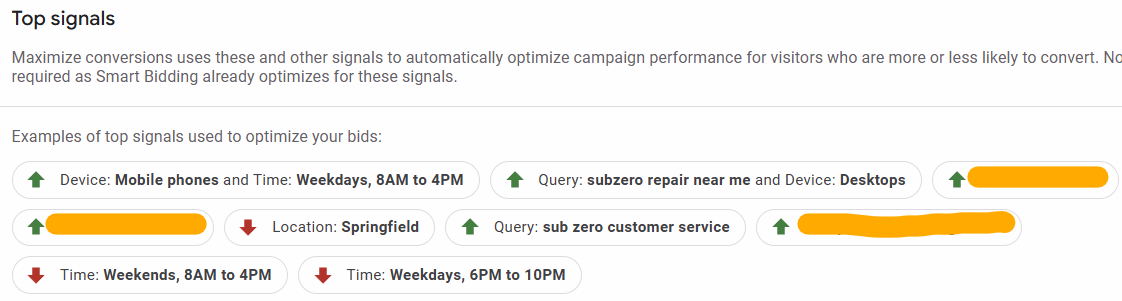
The bid strategy report shows some of the signals Smart Bidding relies on when there is enough data.
The “top signals” can sometimes make sense, and at other times, they can be a bit misleading.
If the algorithm relies on weak signals (e.g., broad search themes and a lack of first-party data), its optimizations will be weak, too.
Recommendation
Make checking your Top Signals a regular activity.
If they don’t align with your business, fix the inputs.
- Improve conversion tracking.
- Import offline conversions.
- Reevaluate search themes.
- Add customer/remarketing lists.
- Expand your negative keyword list(s).
Unleashing the Power of Impression Share Metrics
The issue
When a campaign underdelivers, it’s tempting to assume automation is failing. However, examining Impression Share (IS) metrics tends to reveal the real bottleneck.
You can separate automation problems by looking at Search Lost IS (budget). Also, consider Search Lost IS (rank) and Absolute Top IS together. You can distinguish them from structural or competitive ones.
How to use IS metrics as a diagnostic tool.
- Budget problem
- High Lost IS (budget) + low Lost IS (rank): Your campaign isn’t struggling. It just doesn’t have enough budget to run properly.
- Recommendation: Raise the budget or accept capped volume.
- Targets too aggressive
- High Lost IS (rank) + low Absolute Top IS: Check your budget. Ensure it is adequate if your Lost IS (rank) is high. Your CPA/ROAS targets are likely too aggressive if both conditions are true. This situation causes Smart Bidding to underbid in auctions.
- Recommendation: Loosen targets gradually (10-15%).
Scripts That Ignite the Truth in Automation
Scripts give you early warnings so you can step in before wasted spend piles up.
Anomaly detection
- The issue: Automation can suddenly overspend or underspend when conditions in the marketplace change. You often won’t notice until reporting lags.
- Recommendation: Use an anomaly detection script to flag unusual swings in spend, clicks, or conversions so you can investigate quickly.
Query quality (N-gram analysis)
- The issue: Broad match and PMax can drift into irrelevant themes (“free,” “jobs,” “definition”), wasting budget on low-quality queries.
- Recommendation: Run an N-gram script to surface recurring poor-quality terms and add them as negatives before automation optimizes toward them.
Budget pacing
- The issue: Google won’t exceed your monthly cap, but daily spend will be uneven. Pacing scripts help you spot front-loading.
- Recommendation: A pacing script shows you how spend is distributed. This allows you to adjust daily budgets mid-month. You can also hold back funds when performance is weak.
Transforming Automation into a Powerful Asset
Automation rarely fails in dramatic ways it drifts.
Your job isn’t to fight it, but to supervise it:
- Supply the right signals.
- Track when it goes off course.
- Step in before wasted spend compounds.
The diagnostics we covered include impression share, attribution checks, PMax insights, and scripts. All of these are crucial for understanding the finer details of your advertising performance. They help you separate real failures from superficial discrepancies that may not affect your overall strategy. By implementing these diagnostics, you can gain a clearer picture of how your campaigns are functioning. You can also identify areas needing improvement. These diagnostics help identify genuine issues. They differentiate them from cases where automation is simply following your inputs. This ensures that you are not misled by data that seems misleading at first glance. By effectively utilizing these tools, you empower yourself. This helps you make informed decisions. These decisions can lead to a more successful advertising outcome. Your strategy aligns optimally with your business objectives.
The key takeaway: automation is powerful, but not self-policing.
With the right guardrails and oversight, it becomes an asset instead of a liability.
